
Dear developer,

Every is a Love Letter.

Someone cared enough to write. Love Letter gathers every note — from your app, the App Store and your inbox — onto one desk, so each one is read, filed and answered — by you, or by your agents.

With love, your users
VIA EMAIL · #52 DAYS AGO
Export to PDF?
Is there a way to export a whole year as a PDF? I'd love to print a book of my entries for my mum.
APP STORE · ★★★★★ · US20 HOURS AGO
Finally a journal I stick with
The daily prompts and streaks got me writing every day for two months now.
SDK · IPHONE 16 PRO · V2.3.03 HOURS AGO
Photos disappear after editing an entry
I added three photos, then fixed a typo. After saving, only the first photo is left.
TASK #9 · KEEP ALL PHOTOS2.4.0
I. THE CORRESPONDENCE DESK

All of it on one desk, in the order it arrived.

Filter by tag, version, device, OS or source. A short on-device summary sits on top, so you know what's working and what needs attention before you open a single note.
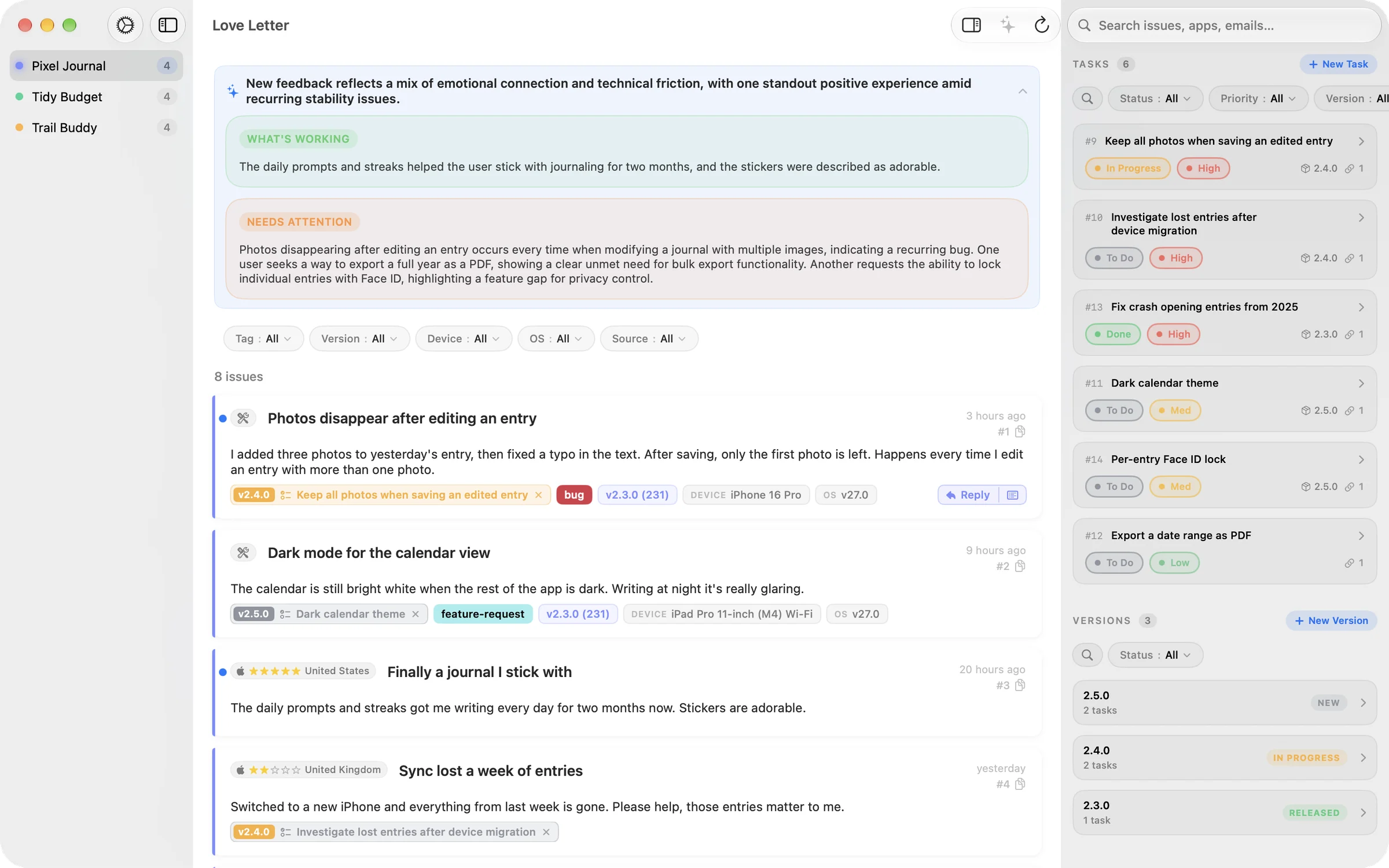
Love Letter on Mac showing feedback for Pixel Journal
II. HOW A LETTER TRAVELS

From “it's broken” to “it's fixed”.

Everything is stored as issues and milestones in your own GitHub repository. No new service to run.

  1. NO. 1
    Received
    The SDK, an App Store review or an email lands as a labelled GitHub issue, with version, device and OS attached.
  2. NO. 2
    Read
    Apple Intelligence summarizes and translates on your device. A German note reads in English.
  3. NO. 3
    Filed
    Attach it to a task, give the task a priority, and slot it into a version.
  4. NO. 4
    Answered
    Reply from your own address. On release day, everyone whose note was fixed gets one personal email.
III. LETTERS YOUR AGENTS CAN READ

Hand the mail to your agents.

A command-line tool and an AI skill let Claude Code, Codex, Cursor or any agent read, file and answer your feedback. Keep a human in the loop, or don't.
  1. NO
    HUMAN
    ROUTE 1
    Morning triage
    A scheduled agent reads the night's mail, links duplicates to existing tasks and files new ones. You read the summary over coffee.
  2. YOU
    REVIEW
    ROUTE 2
    Bug to pull request
    An agent takes a high-priority bug, reproduces it with the attached device, OS and version, and opens a fix for your review.
  3. YOU
    SIGN
    ROUTE 3
    Reply on release
    When a version ships, the agent drafts a reply to everyone whose note it fixed. You approve each one, or let it send.
  4. YOUR
    RULES
    ROUTE 4
    Your own pipeline
    Everything comes out as JSON, so CI, chat, cron or a dashboard can use it. You decide where a human steps in, if anywhere.
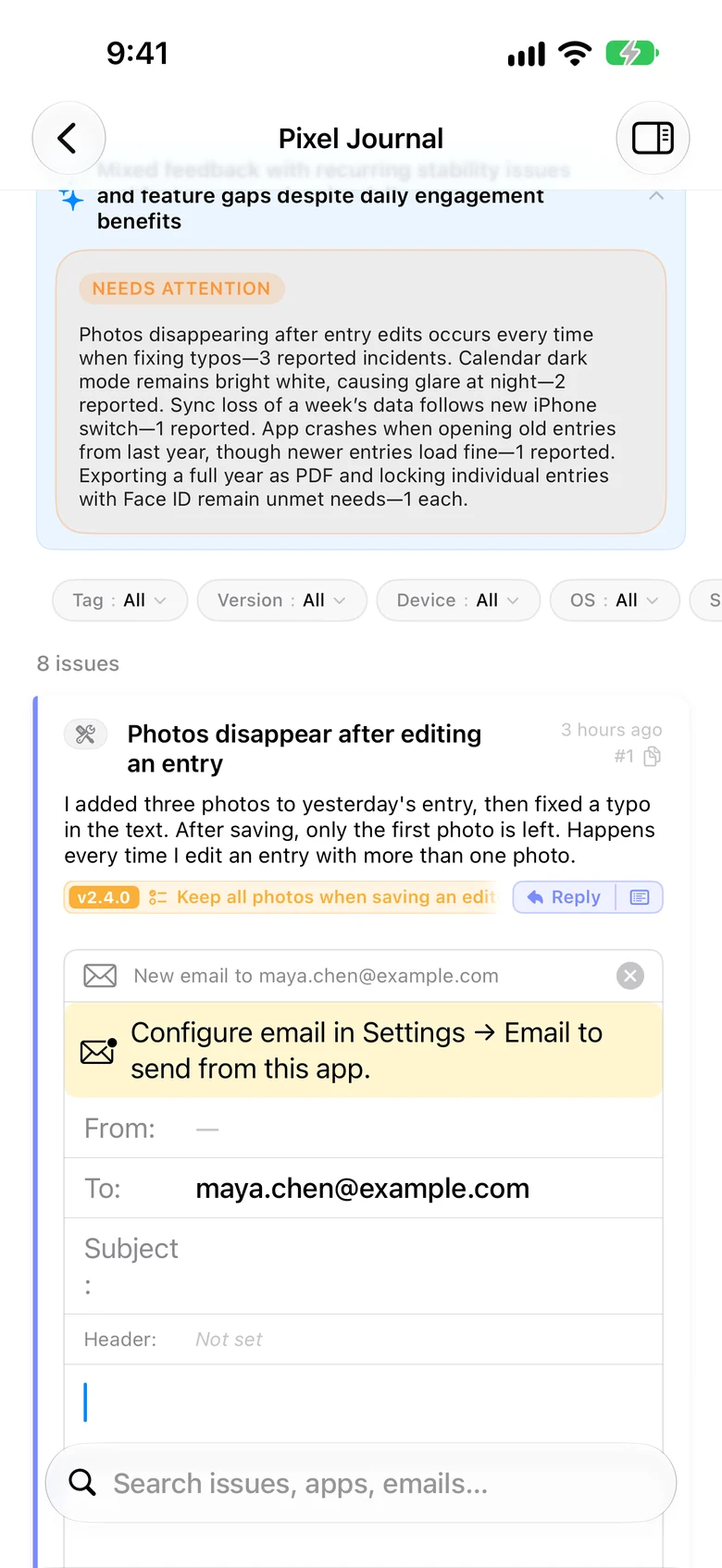
Reply composer on iPhone
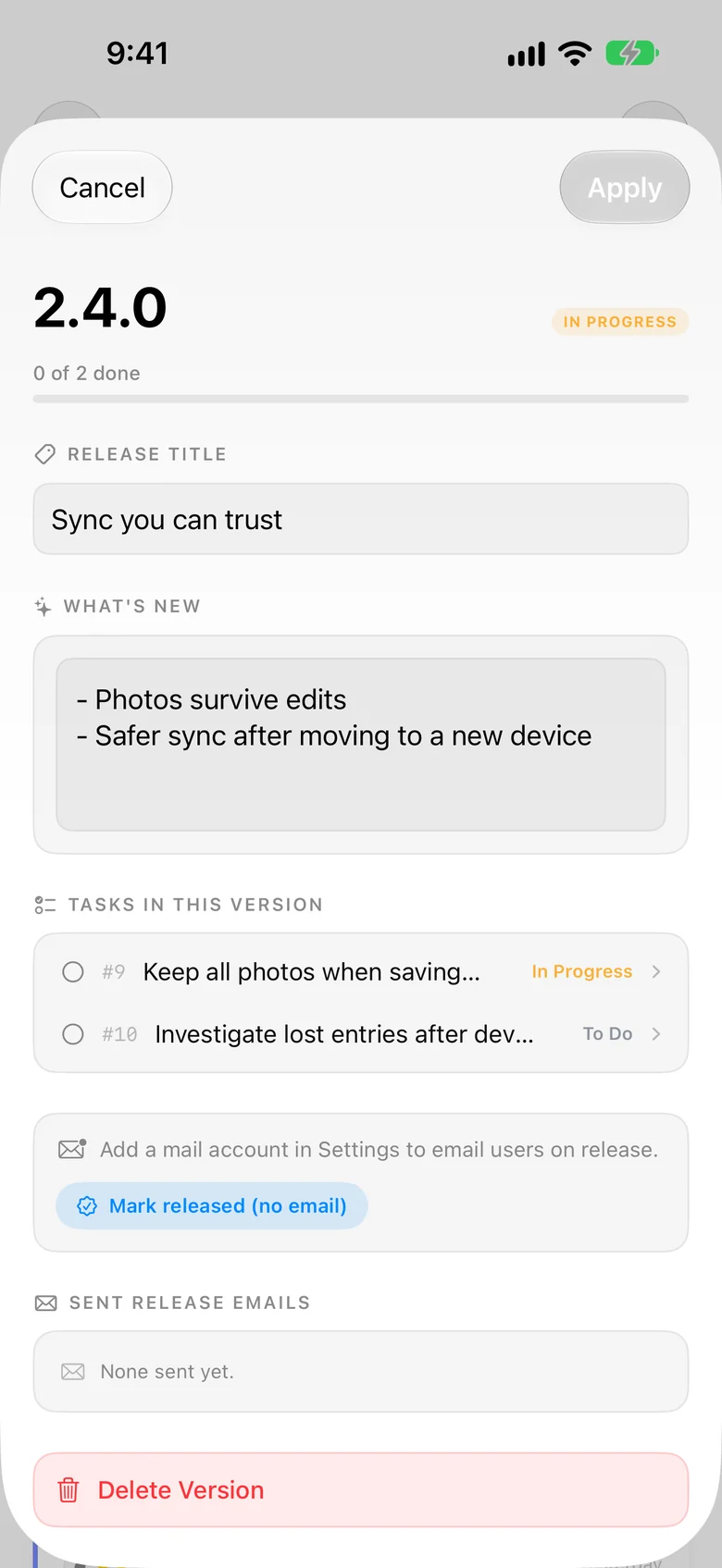
Version detail with release notes on iPhone
IV. WRITING BACK

A reply is the kindest feature you can ship.

Send from your own mail account with your header and footer. Keep templates like “Thanks — we're on it” and “Fixed in the latest update” one tap away, from your Mac, iPad or iPhone.

“Good news: this is fixed in the update that just went out. Please update from the App Store.”
V. POSTAGE FOR EVERY PLATFORM

Send from anywhere. Arrives the same.

Open-source SDKs for Apple, Android and the Web write a byte-identical GitHub issue, checked against shared golden fixtures in every SDK's CI.

SWIFTMIT
Apple
iOS, macOS, watchOS, tvOS, visionOS. A SwiftUI sheet.
KOTLINMIT
Android
minSdk 24. A Jetpack Compose sheet.
TYPESCRIPTMIT
Web
A dependency-free widget and a React component.
SERVERMIT
Relay
Cloudflare, Firebase or Appwrite. Your token stays yours.
VI. SEALED

Private letters stay private.

On-device AI
Summaries, translation and triage run on Apple Intelligence. Nothing is sent anywhere to be read.
Your repository
Feedback lives in your GitHub repo. Products, accounts and templates sync through your own iCloud.
Tokens you hold
On the web, the SDK talks only to a relay you deploy. No credential ships to the browser.

Write back soon.

In beta for Mac, iPad and iPhone, by TestFlight. — Yours, Amir